New Free tools for your fleet: check sheets, trackers and calculators. No sign up. See the free tools →
Free download

Free vehicle running cost calculator

Find out what each vehicle really costs you, per month and per kilometre. Add a year of costs and the sheet shows which vehicles cost the most to run.
Download free Excel Or use the online calculator Excel 35 KB. No sign up needed.
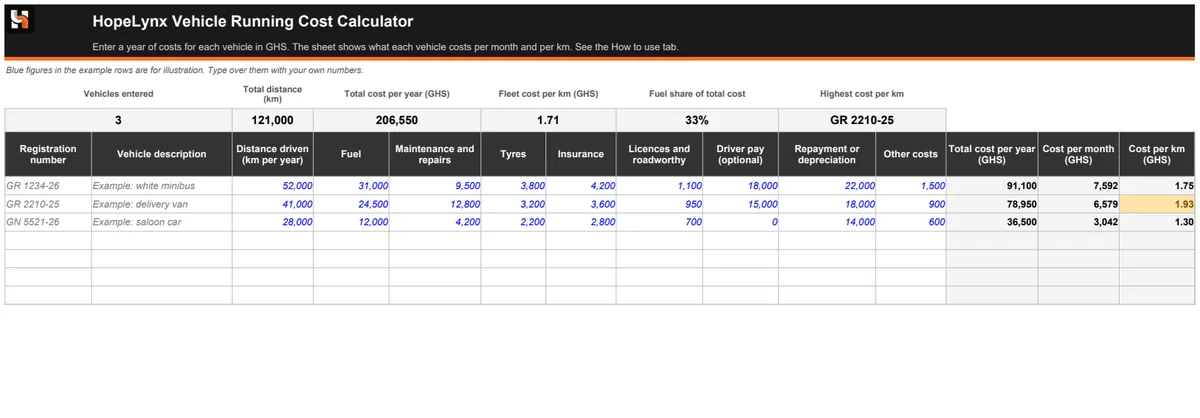
Preview of the HopeLynx vehicle running cost calculator showing cost per month and per km for each vehicle

Preview. Click to enlarge.

What is inside

  • ✓ Space for 30 vehicles, with columns for fuel, maintenance and repairs, tyres, insurance, licences and roadworthy, driver pay, repayment or depreciation, and other costs
  • ✓ Total cost per year, cost per month and cost per km worked out for every vehicle
  • ✓ Fleet totals at the top: total cost, fleet cost per km and how much of the cost is fuel
  • ✓ The vehicle that costs the most per km marked in amber
  • ✓ A How to use tab that explains where to find each number

How to use it

  1. Download the file and open it in Microsoft Excel. It also works in LibreOffice.
  2. Type over the example rows, then add a row for each vehicle.
  3. Enter a year of costs, and the distance driven over the same year. Leave a box empty if it does not apply.
  4. Read the cost per km, and compare vehicles of the same type.
  5. Look into any vehicle marked amber, and decide whether to repair it, change its route or replace it.

Why it matters

Most fleet owners know their fuel bill but not what a vehicle really costs once repairs, tyres, insurance and repayments are added. Cost per kilometre lets you compare vehicles fairly and decide with facts. Our article on what a vehicle really costs to run explains how to gather the numbers.

Need more than this?

This free download covers the basics. A calculator only knows the numbers you type in, and collecting them takes time. If you want more, we can help with:

  • ✓ Fuel, maintenance and incident records captured automatically
  • ✓ The cost of each vehicle, ready without typing
  • ✓ Reports you can share with owners and managers

Questions about this download

What costs should I include?

Fuel, maintenance and repairs, tyres, insurance, licences and roadworthy, repayments or depreciation, any other costs such as parking and tolls, and driver pay if you want it included.

Why use a full year?

Some costs arrive once a year and others every week, so a single month can mislead you. Twelve months gives a fairer picture.

What does the amber mark mean?

It marks the vehicle with the highest cost per km. It is a prompt to look closer, not a verdict, so compare it with similar vehicles.

Is my information shared?

No. The file stays on your computer, and nothing you type is sent to us.

Can costs be recorded automatically?

Yes. Fleet Command Hub records fuel, maintenance and incidents for each vehicle as they happen. Get in touch to find out more.

More from HopeLynx

Want costs recorded automatically?

Fleet Command Hub keeps fuel, maintenance and incident records for every vehicle, so costs are ready when you need them.

Call usWhatsApp